


FlyArystan Voucher
FlyArystan voucher is an electronic document that may be provided by the airline to a passenger as compensation or as a goodwill gesture in certain cases.
The voucher can be used to purchase a new ticket or additional services (seat selection, meals, baggage) only before the flight departure. During the flight voucher payment is not available.
- Voucher is issued for each passenger in booking.
- Each passenger can use a personal voucher issued in his/her name to pay only for his/her tickets and additional services. The name and surname of the passenger must match the name and surname on the voucher.
- Each passenger can use up to 2 vouchers within a payment.
- If the available amount on voucher is not enough to pay for ticket the balance is paid by payment card.
- If the available amount on voucher is more than ticket amount a new voucher is automatically issued for the difference. This voucher can be used by passenger for later payments until the expiration date of the voucher.
- If the voucher was issued at the airport, it can only be used once. After the first use, this voucher becomes invalid, regardless of the price of the ticket you are purchasing.
FlyArystan Voucher:
- Can be used for future travel bookings and FlyArystan additional services (seat allocation, meals or baggage etc; voucher cannot be used for third-party providers' services) and is valid for 3 months from the date it is issued.
- Can be used by a passenger himself while booking via www.flyarystan.com website or FlyArystan Mobile App, as well as via Contact Centre by phone +7 727 331 10 10 or travel agencies.
- Is non-transferable to any other person.
- Can’t be provided in a cash value.
- Is not valid as a separate document for transportation.
How to use the voucher:
The voucher can be used only after booking the ticket (after choosing dates and directions, and filling passenger's info)
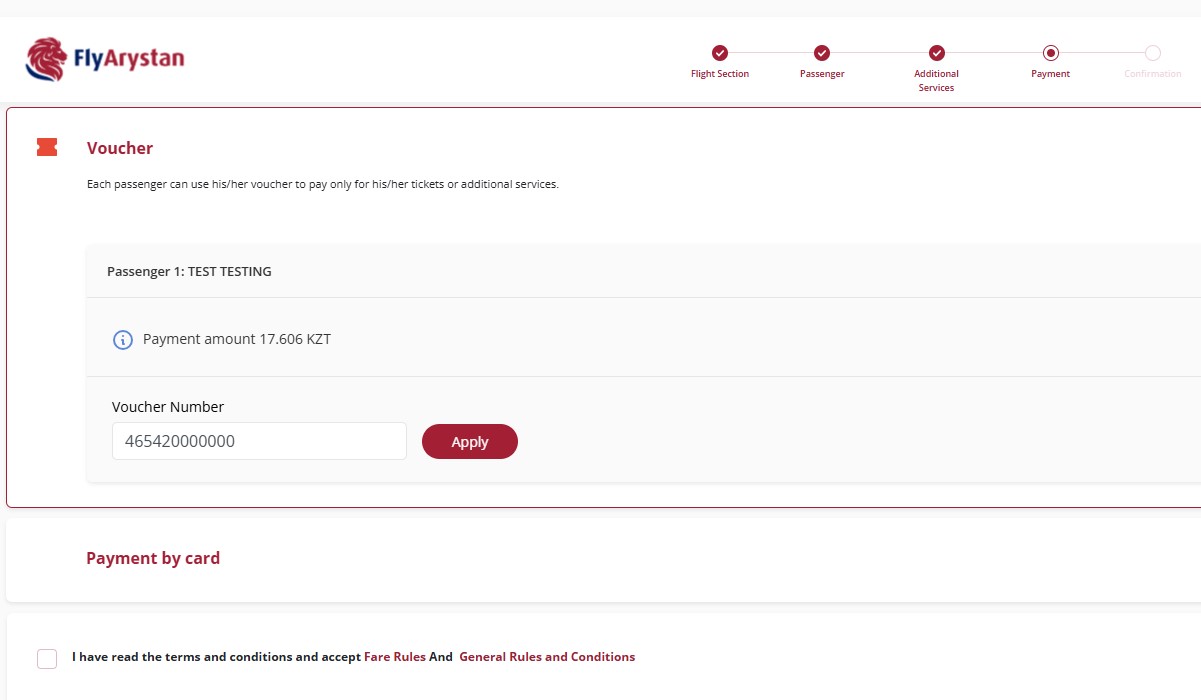
During the stage of payment, you need to choose the payment method «Payment by voucher», then choose the passenger name, fill in the voucher number, then click on «Apply».
Make sure that you enter the voucher number in one piece, without hyphens and gaps, for example, 164420000000.»
Find answers to frequently asked questions about vouchers and refunds here.